
Always-on-top panel
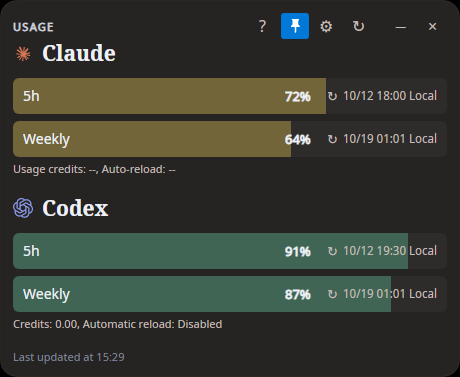
A compact Avalonia panel shows the 5h and weekly limits for each provider, with remaining percentage, local reset time, and credit details.
LINUX APP
Claude Codex Usage Companion is a local, open-source usage monitor. A small always-on-top panel, tray icon, Plasma 6 widget, and CLI show remaining session and weekly limits with local reset times.
FEATURES
A compact Avalonia panel shows the 5h and weekly limits for each provider, with remaining percentage, local reset time, and credit details.
Claude Code and Codex are both enabled by default. Turn off either provider in Settings to stop its usage checks.
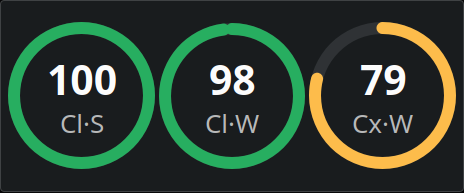
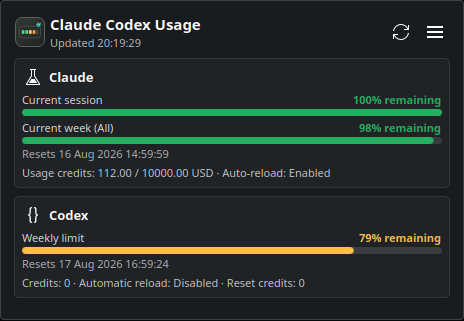
Four tray icon styles, plus a KDE Plasma 6 widget with circle or bar views for the panel and desktop.
Print current limits once, refresh continuously in the terminal, or return JSON for your own tools.
Optional low-usage alerts, reset notifications, and CSV usage logs. Automatic update checks tell you when a new release is out.
No telemetry. The app talks only to each provider, renews Claude credentials in their original file, and never writes tokens to logs.
SCREENSHOTS
REQUIREMENTS
codex on PATH.INSTALL
Download one package from the latest release. The commands below use v0.1.3; change the file name if you download a newer version.
sudo apt install ./claude-codex-usage-companion_0.1.3_amd64.debInstalls the claude-codex-usage-companion command, the shorter claude-codex-usage alias, an application menu entry, and the Plasma 6 widget. Required host libraries are installed automatically.
sudo apt install libx11-6 libice6 libsm6 libfontconfig1 libharfbuzz0b fonts-noto-cjk libnotify-bin
sudo snap install --classic --dangerous ./claude-codex-usage-companion_0.1.3_amd64.snap
sudo snap alias claude-codex-usage-companion claude-codex-usage
--dangerous is needed because the file does not come from the Snap Store. Classic confinement lets the app read ~/.codex, renew Claude credentials in ~/.claude, start the codex CLI, and send notifications. The alias command is optional.
To add the Plasma widget that ships inside the snap:
kpackagetool6 --type Plasma/Applet --install /snap/claude-codex-usage-companion/current/usr/share/plasma/claude-codex-usage-companion-0.1.3.plasmoidsudo apt install libx11-6 libice6 libsm6 libfontconfig1 libharfbuzz0b fonts-noto-cjk libnotify-bin
tar -xzf claude-codex-usage-companion-0.1.3-linux-x64.tar.gz
cd claude-codex-usage-companion-0.1.3-linux-x64
install -D -m 755 claude-codex-usage-companion ~/.local/bin/claude-codex-usage-companionMake sure PATH includes ~/.local/bin. The archive does not add a menu entry or the short alias. It contains a .plasmoid widget package that you can install with kpackagetool6.
codex plugin marketplace add /path/to/extracted-marketplaceExtract CodexUsageCompanionMarketplace-v0.1.3-linux-x64.zip and add it as a marketplace. Install and enable the plugin, then trust its SessionStart and Stop hooks when Codex asks. The plugin contains its own copy of the app.
To verify downloads, put SHA256SUMS in the same directory and run sha256sum --check --ignore-missing SHA256SUMS. Every file should show OK.
SET UP
The app reads Codex usage through the official CLI's app-server subcommand.
curl -fsSL https://chatgpt.com/codex/install.sh | sh
codex logincommand -v codex
codex login status
codex app-server --help >/dev/null && echo "Codex app-server is available"If Codex is somewhere unusual, set CODEX_CLI_PATH=/absolute/path/to/codex.
Install Claude Code, sign in, and run claude once to create ~/.claude/.credentials.json. If you don't use Claude Code, clear Enable Claude usage in Settings.
USAGE
Launch Claude Codex Usage Companion from the application menu, or run:
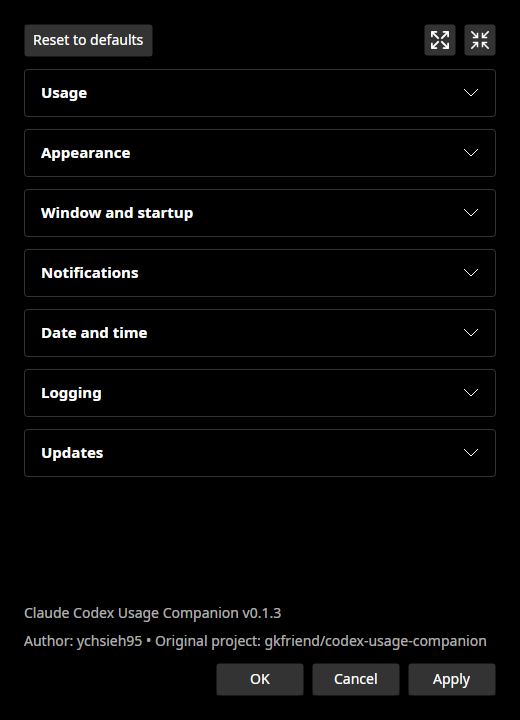
claude-codex-usage-companion guiSelect ⚙ Settings to change language, theme, position, tray icon, alerts, logging, and automatic startup at login.
Right-click the desktop or panel, select Add Widgets, search for “Claude Codex Usage”, and drag it into place.
claude-codex-usage status             # print current limits
claude-codex-usage status --json      # machine-readable JSON
claude-codex-usage watch --interval 30 # refresh every 30 seconds
claude-codex-usage config             # show settings path and values
Without the alias, use claude-codex-usage-companion. Settings are stored in ~/.config/claude-codex-usage-companion/settings.json.
Turn off automatic startup in Settings first, then run the command for your package:
sudo apt remove claude-codex-usage-companion   # .deb
sudo snap remove claude-codex-usage-companion  # .snap
rm ~/.local/bin/claude-codex-usage-companion   # .tar.gz